

Club Championship
The Club Championship is a private competition format designed for fishing clubs, friend groups, or any organised angling community. As a tournament admin, you have full control over species rules, participant management, and moderation — all within the Open Fishing Cup platform.Who Can Create a Club Championship?
Any registered user can create a Club Championship. Once you create one, you are automatically assigned the Tournament Admin role for that competition, giving you access to management and moderation tools.There is a configurable limit on how many competitions a single user can create.
Pricing
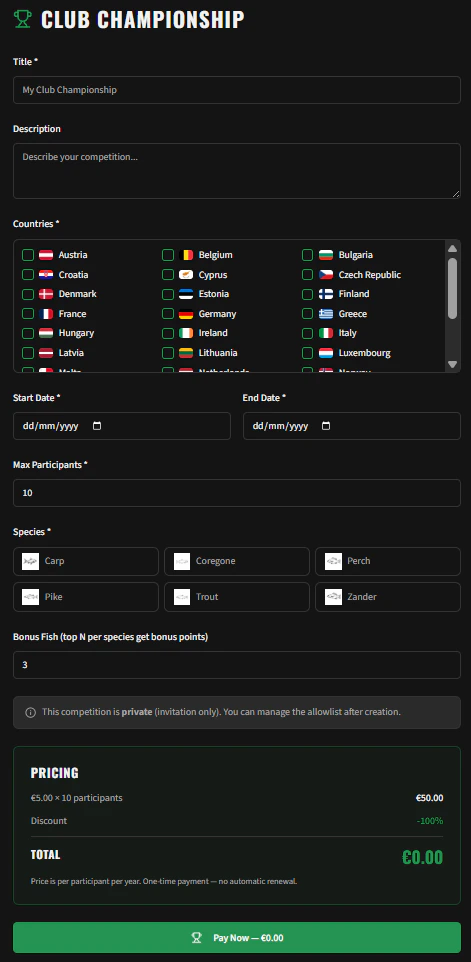
Club Championships are billed per participant, per year as a one-time payment — there is no automatic renewal.- The default rate is €5.00 per participant
- A global discount percentage may be available (up to 100% off)
- The final price is calculated and shown before you confirm payment
Creating a Championship
Navigate to Competitions → Create Club Championship or visit the/club-championship page.
Step 1: Basic Information
Step 2: Species Configuration
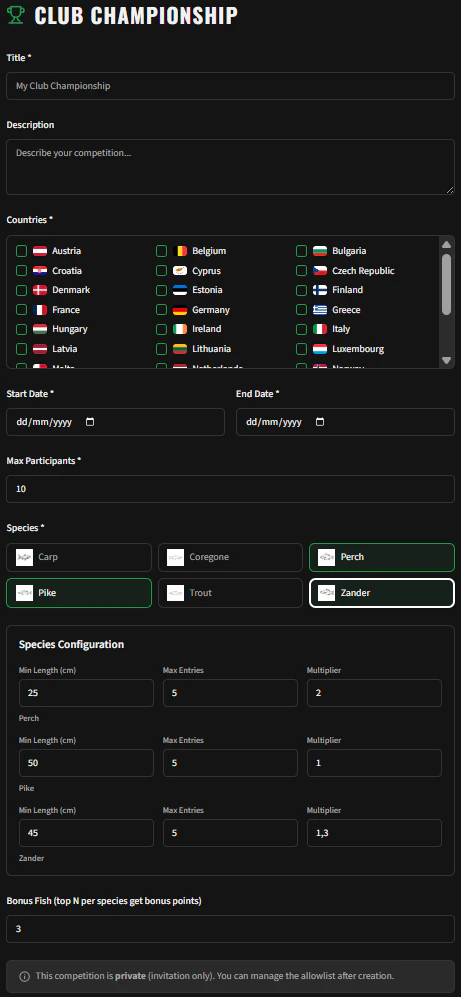
Select which species are eligible for your championship. For each species you can configure:- Minimum Length (cm) — Catches below this length will not score points
- Max Entries — How many catches of this species count towards the ranking per angler
- Multiplier — A scoring multiplier applied to the length (e.g., 1.5× for pike)
Step 3: Bonus Fish
Set the Bonus Fish value — the top X additional fish from any species allowed in the tournament that scored the most points. These extra catches are added to the angler’s total, rewarding consistent performance across all eligible species.Step 4: Confirm & Pay
Review the pricing summary:- Number of participant slots × price per participant
- Any applicable discount
- Total amount
Managing Your Championship
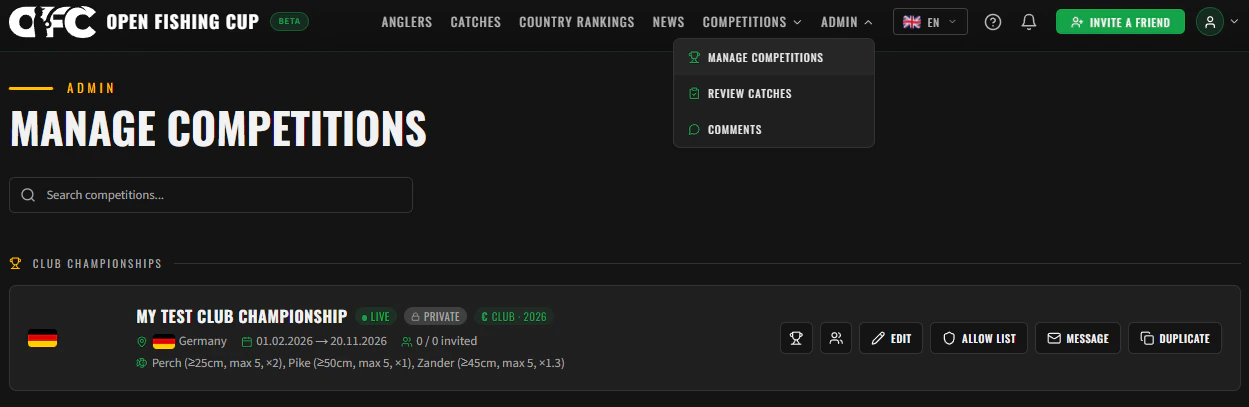
Navigate to Menu → Manage Competitions to see all championships you administer.Competition Cards
Each competition is displayed as a card showing:- Status badge: Upcoming (grey), Live (green), or Completed (red)
- Participant count: For public competitions: Registered / Max. For private: Registered / Invited
- Payment badge (€): Indicates this is a paid Club Championship
Editing Settings
Click the Edit button on a competition card to modify settings. You can change:- Title, description, countries
- Species configuration (min length, max entries, multiplier)
- Bonus fish value
- Max participants
- Start and end dates (within the same calendar year)
Inviting Participants (Allowlist)
Club Championships are private by default. Only users on the allowlist can register. Click the Manage Allowlist button on your competition card to open the participant management dialog.Adding Users
- Email address: Type any email address to add someone to the allowlist — they do not need to have an existing account. If the email belongs to a registered user, they are linked automatically; otherwise, an invitation is sent to create an account.
- CSV Import: Upload a CSV file with email addresses to bulk-invite participants
How Invitations Work (Magic Links)
When you add an email to the allowlist, the system sends a Magic Link invitation email to that person. The invitation works differently depending on whether the recipient already has an account:When a new user arrives via an invitation link, the Google login button is hidden on the signup page. This ensures they register with the exact email address associated with their invitation, maintaining data consistency.
Allowlist Status Badges
The allowlist UI tracks the progress of each invitation with status badges:Resending Invitations
You can resend an invitation email to any user on the allowlist who hasn’t registered yet. This is useful if the original email was missed or expired.Removing Users
When you remove a user from the allowlist:- Their registration is automatically deleted
- Their ranking data is automatically removed
- They will no longer appear in the competition
Visibility of Private Competitions
Private competitions remain visible to all users on public listings with an “Invitation Only” badge. However, the registration button is only shown to eligible users (those on the allowlist, the competition owner, or assigned admins).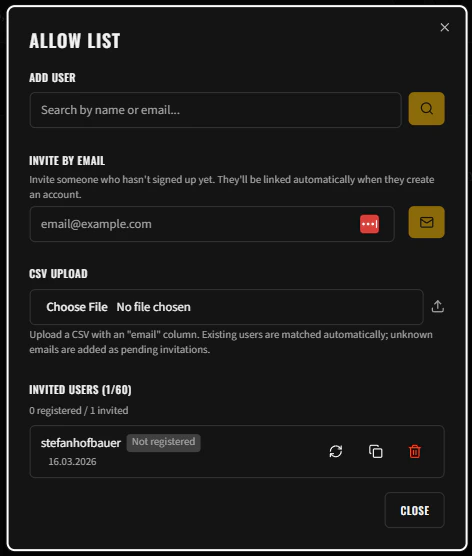
Messaging Participants
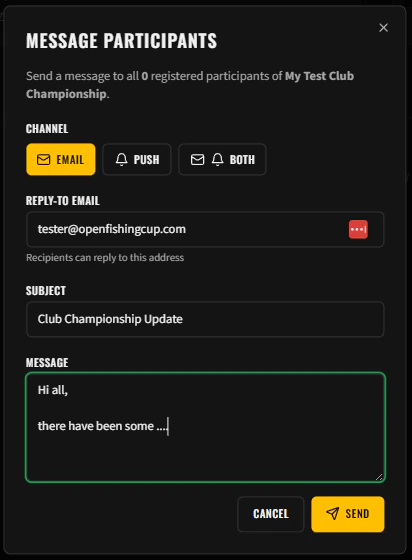
You can send messages to all registered participants of your championship. Click the Message button on your competition card to open the message sender.Message Options
The dialog shows the recipient count — the number of registered participants who will receive your message.
Viewing Rankings
Click the Rankings button on your competition card or navigate directly to the competition’s rankings page. Rankings show:- Overall rank and total points per angler
- Species points breakdown
- Bonus points from species diversity
- Individual catch details with points earned
Renewing / Duplicating a Championship
When a championship ends (status: Completed), you can duplicate it for the next season:- Click the Duplicate button on the completed competition card
- The form is pre-filled with the same settings (title, species, rules)
- Dates are automatically set for the following calendar year
- Adjust any settings as needed and confirm
Deleting a Championship
You can delete a championship from the management dashboard. This action is irreversible. When a championship is deleted, the following data is permanently removed:- All registrations
- All rankings and catch points
- All allowlist entries
- All catch exclusion records
- Competition logos, trophies, and sponsor images from storage
- Ranking calculation logs