> ## Documentation Index
> Fetch the complete documentation index at: https://help.openfishingcup.com/llms.txt
> Use this file to discover all available pages before exploring further.
# Club Championship
> Complete guide for creating and managing your Club Championship tournament
# Club Championship
The Club Championship is a private competition format designed for fishing clubs, friend groups, or any organised angling community. As a tournament admin, you have full control over species rules, participant management, and moderation — all within the Open Fishing Cup platform.
## Who Can Create a Club Championship?
Any registered user can create a Club Championship. Once you create one, you are automatically assigned the **Tournament Admin** role for that competition, giving you access to management and moderation tools.
There is a configurable limit on how many competitions a single user can create.
## Pricing
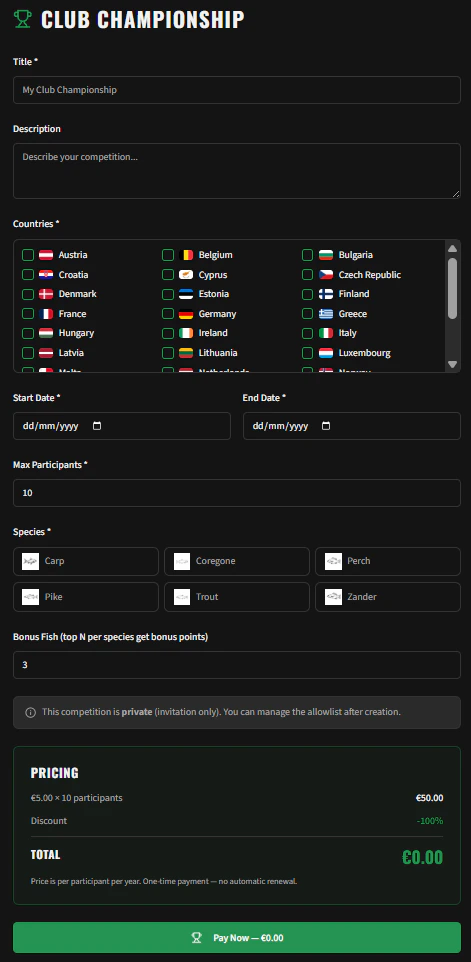
Club Championships are billed **per participant, per year** as a one-time payment — there is no automatic renewal.
* The default rate is **€5.00 per participant**
* A global discount percentage may be available (up to 100% off)
* The final price is calculated and shown before you confirm payment
 ***
## Creating a Championship
Navigate to **Competitions → Create Club Championship** or visit the `/club-championship` page.
### Step 1: Basic Information
| Field | Description |
| -------------------- | ----------------------------------------------------------- |
| **Title** | The name of your championship (e.g., "Pike Masters 2026") |
| **Description** | A short description visible to participants |
| **Countries** | Select one or more countries where catches will be accepted |
| **Start Date** | The first day of the competition |
| **End Date** | The last day of the competition |
| **Max Participants** | Maximum number of anglers who can register |
Start and end dates must fall within the **same calendar year**.
***
## Creating a Championship
Navigate to **Competitions → Create Club Championship** or visit the `/club-championship` page.
### Step 1: Basic Information
| Field | Description |
| -------------------- | ----------------------------------------------------------- |
| **Title** | The name of your championship (e.g., "Pike Masters 2026") |
| **Description** | A short description visible to participants |
| **Countries** | Select one or more countries where catches will be accepted |
| **Start Date** | The first day of the competition |
| **End Date** | The last day of the competition |
| **Max Participants** | Maximum number of anglers who can register |
Start and end dates must fall within the **same calendar year**.
 ### Step 2: Species Configuration
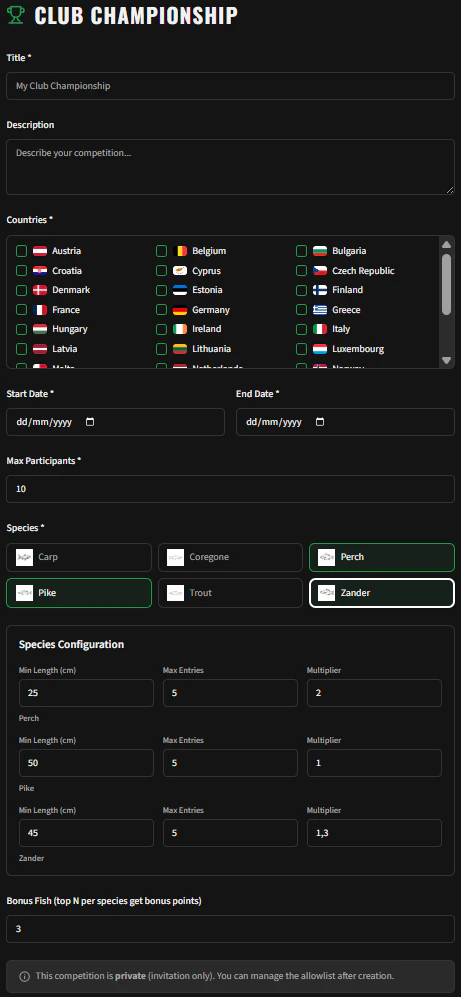
Select which species are eligible for your championship. For each species you can configure:
* **Minimum Length (cm)** — Catches below this length will not score points
* **Max Entries** — How many catches of this species count towards the ranking per angler
* **Multiplier** — A scoring multiplier applied to the length (e.g., 1.5× for pike)
At least one species must be selected. The defaults are pre-filled from the platform's species database, but you can customise them freely.
### Step 3: Bonus Fish
Set the **Bonus Fish** value — the top X additional fish from any species allowed in the tournament that scored the most points. These extra catches are added to the angler's total, rewarding consistent performance across all eligible species.
### Step 4: Confirm & Pay
Review the pricing summary:
* Number of participant slots × price per participant
* Any applicable discount
* Total amount
After confirming, your championship is created and you are redirected to the management dashboard.
***
## Managing Your Championship
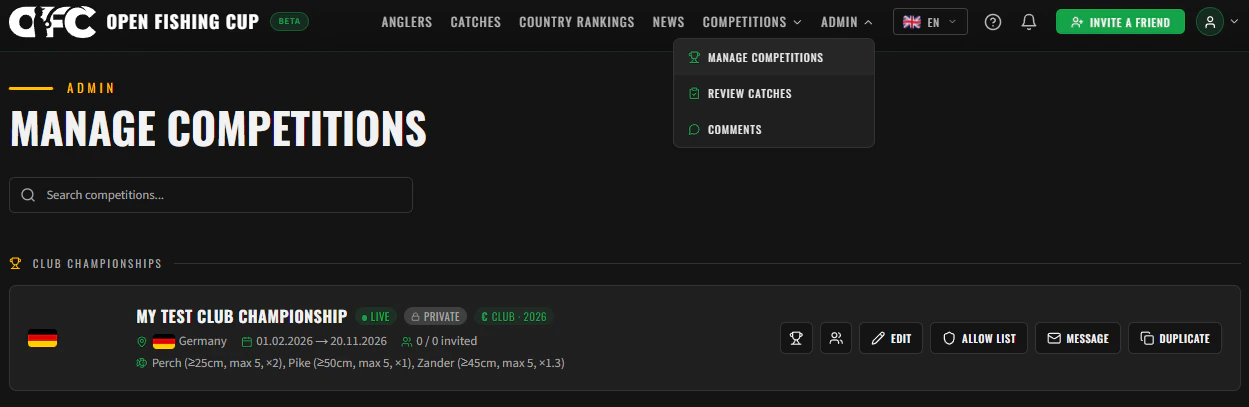
Navigate to **Menu → Manage Competitions** to see all championships you administer.
### Competition Cards
Each competition is displayed as a card showing:
* **Status badge**: Upcoming (grey), Live (green), or Completed (red)
* **Participant count**: For public competitions: *Registered / Max*. For private: *Registered / Invited*
* **Payment badge** (€): Indicates this is a paid Club Championship
### Step 2: Species Configuration
Select which species are eligible for your championship. For each species you can configure:
* **Minimum Length (cm)** — Catches below this length will not score points
* **Max Entries** — How many catches of this species count towards the ranking per angler
* **Multiplier** — A scoring multiplier applied to the length (e.g., 1.5× for pike)
At least one species must be selected. The defaults are pre-filled from the platform's species database, but you can customise them freely.
### Step 3: Bonus Fish
Set the **Bonus Fish** value — the top X additional fish from any species allowed in the tournament that scored the most points. These extra catches are added to the angler's total, rewarding consistent performance across all eligible species.
### Step 4: Confirm & Pay
Review the pricing summary:
* Number of participant slots × price per participant
* Any applicable discount
* Total amount
After confirming, your championship is created and you are redirected to the management dashboard.
***
## Managing Your Championship
Navigate to **Menu → Manage Competitions** to see all championships you administer.
### Competition Cards
Each competition is displayed as a card showing:
* **Status badge**: Upcoming (grey), Live (green), or Completed (red)
* **Participant count**: For public competitions: *Registered / Max*. For private: *Registered / Invited*
* **Payment badge** (€): Indicates this is a paid Club Championship
 ### Editing Settings
Click the **Edit** button on a competition card to modify settings. You can change:
* Title, description, countries
* Species configuration (min length, max entries, multiplier)
* Bonus fish value
* Max participants
* Start and end dates (within the same calendar year)
***
## Inviting Participants (Allowlist)
Club Championships are **private by default**. Only users on the allowlist can register.
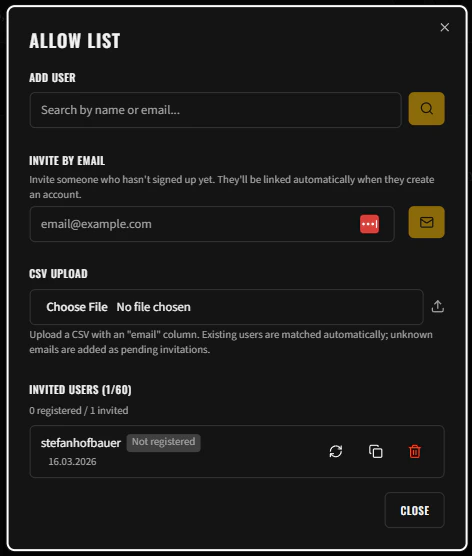
Click the **Manage Allowlist** button on your competition card to open the participant management dialog.
### Adding Users
* **Email address**: Type any email address to add someone to the allowlist — they do not need to have an existing account. If the email belongs to a registered user, they are linked automatically; otherwise, an invitation is sent to create an account.
* **CSV Import**: Upload a CSV file with email addresses to bulk-invite participants
### How Invitations Work (Magic Links)
When you add an email to the allowlist, the system sends a **Magic Link** invitation email to that person. The invitation works differently depending on whether the recipient already has an account:
| Recipient Status | What Happens |
| ----------------- | ------------------------------------------------------------------------------------------- |
| **Existing user** | They receive an email with a link that takes them directly to the competition rankings page |
| **New user** | They receive an email with a link to a signup page with their email pre-filled |
When a new user arrives via an invitation link, the **Google login button is hidden** on the signup page. This ensures they register with the exact email address associated with their invitation, maintaining data consistency.
Once a new user completes registration, their profile is **automatically linked** to the pending invitation — no manual action needed from the admin.
### Allowlist Status Badges
The allowlist UI tracks the progress of each invitation with status badges:
| Badge | Meaning |
| --------------------- | ------------------------------------------------------------------ |
| ✅ **Registered** | The user has an account and has registered for the competition |
| 🕐 **Not registered** | The user has an account but hasn't registered yet |
| ✉️ **Pending** | The invitation was sent but the user hasn't created an account yet |
### Resending Invitations
You can **resend** an invitation email to any user on the allowlist who hasn't registered yet. This is useful if the original email was missed or expired.
### Removing Users
When you remove a user from the allowlist:
* Their **registration** is automatically deleted
* Their **ranking data** is automatically removed
* They will no longer appear in the competition
### Visibility of Private Competitions
Private competitions remain **visible to all users** on public listings with an **"Invitation Only"** badge. However, the registration button is only shown to eligible users (those on the allowlist, the competition owner, or assigned admins).
### Editing Settings
Click the **Edit** button on a competition card to modify settings. You can change:
* Title, description, countries
* Species configuration (min length, max entries, multiplier)
* Bonus fish value
* Max participants
* Start and end dates (within the same calendar year)
***
## Inviting Participants (Allowlist)
Club Championships are **private by default**. Only users on the allowlist can register.
Click the **Manage Allowlist** button on your competition card to open the participant management dialog.
### Adding Users
* **Email address**: Type any email address to add someone to the allowlist — they do not need to have an existing account. If the email belongs to a registered user, they are linked automatically; otherwise, an invitation is sent to create an account.
* **CSV Import**: Upload a CSV file with email addresses to bulk-invite participants
### How Invitations Work (Magic Links)
When you add an email to the allowlist, the system sends a **Magic Link** invitation email to that person. The invitation works differently depending on whether the recipient already has an account:
| Recipient Status | What Happens |
| ----------------- | ------------------------------------------------------------------------------------------- |
| **Existing user** | They receive an email with a link that takes them directly to the competition rankings page |
| **New user** | They receive an email with a link to a signup page with their email pre-filled |
When a new user arrives via an invitation link, the **Google login button is hidden** on the signup page. This ensures they register with the exact email address associated with their invitation, maintaining data consistency.
Once a new user completes registration, their profile is **automatically linked** to the pending invitation — no manual action needed from the admin.
### Allowlist Status Badges
The allowlist UI tracks the progress of each invitation with status badges:
| Badge | Meaning |
| --------------------- | ------------------------------------------------------------------ |
| ✅ **Registered** | The user has an account and has registered for the competition |
| 🕐 **Not registered** | The user has an account but hasn't registered yet |
| ✉️ **Pending** | The invitation was sent but the user hasn't created an account yet |
### Resending Invitations
You can **resend** an invitation email to any user on the allowlist who hasn't registered yet. This is useful if the original email was missed or expired.
### Removing Users
When you remove a user from the allowlist:
* Their **registration** is automatically deleted
* Their **ranking data** is automatically removed
* They will no longer appear in the competition
### Visibility of Private Competitions
Private competitions remain **visible to all users** on public listings with an **"Invitation Only"** badge. However, the registration button is only shown to eligible users (those on the allowlist, the competition owner, or assigned admins).
 ***
## Messaging Participants
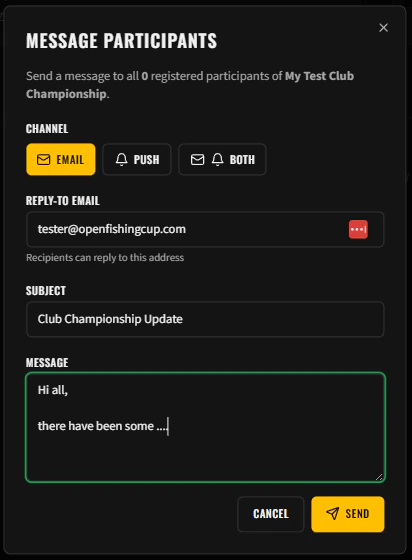
You can send messages to all registered participants of your championship.
Click the **Message** button on your competition card to open the message sender.
### Message Options
| Field | Description |
| ------------ | ------------------------------------------- |
| **Channel** | Choose Email, Push Notification, or Both |
| **Reply-To** | Your email address for replies (pre-filled) |
| **Subject** | Message subject line (max 200 characters) |
| **Message** | Message body (max 2,000 characters) |
The dialog shows the **recipient count** — the number of registered participants who will receive your message.
***
## Messaging Participants
You can send messages to all registered participants of your championship.
Click the **Message** button on your competition card to open the message sender.
### Message Options
| Field | Description |
| ------------ | ------------------------------------------- |
| **Channel** | Choose Email, Push Notification, or Both |
| **Reply-To** | Your email address for replies (pre-filled) |
| **Subject** | Message subject line (max 200 characters) |
| **Message** | Message body (max 2,000 characters) |
The dialog shows the **recipient count** — the number of registered participants who will receive your message.
 ***
## Viewing Rankings
Click the **Rankings** button on your competition card or navigate directly to the competition's rankings page. Rankings show:
* Overall rank and total points per angler
* Species points breakdown
* Bonus points from species diversity
* Individual catch details with points earned
Rankings are automatically recalculated whenever catches are approved, rejected, or excluded.
***
## Renewing / Duplicating a Championship
When a championship ends (status: **Completed**), you can **duplicate** it for the next season:
1. Click the **Duplicate** button on the completed competition card
2. The form is pre-filled with the same settings (title, species, rules)
3. Dates are automatically set for the **following calendar year**
4. Adjust any settings as needed and confirm
This creates a brand new championship — participants will need to register again.
***
## Deleting a Championship
You can delete a championship from the management dashboard. **This action is irreversible.**
When a championship is deleted, the following data is permanently removed:
* All registrations
* All rankings and catch points
* All allowlist entries
* All catch exclusion records
* Competition logos, trophies, and sponsor images from storage
* Ranking calculation logs
If you are the only competition assigned to your Tournament Admin role, deleting the championship will also **revoke your Tournament Admin role** automatically.
***
## Viewing Rankings
Click the **Rankings** button on your competition card or navigate directly to the competition's rankings page. Rankings show:
* Overall rank and total points per angler
* Species points breakdown
* Bonus points from species diversity
* Individual catch details with points earned
Rankings are automatically recalculated whenever catches are approved, rejected, or excluded.
***
## Renewing / Duplicating a Championship
When a championship ends (status: **Completed**), you can **duplicate** it for the next season:
1. Click the **Duplicate** button on the completed competition card
2. The form is pre-filled with the same settings (title, species, rules)
3. Dates are automatically set for the **following calendar year**
4. Adjust any settings as needed and confirm
This creates a brand new championship — participants will need to register again.
***
## Deleting a Championship
You can delete a championship from the management dashboard. **This action is irreversible.**
When a championship is deleted, the following data is permanently removed:
* All registrations
* All rankings and catch points
* All allowlist entries
* All catch exclusion records
* Competition logos, trophies, and sponsor images from storage
* Ranking calculation logs
If you are the only competition assigned to your Tournament Admin role, deleting the championship will also **revoke your Tournament Admin role** automatically.